
Trex IPTV
Symptom first, fix second

Trex IPTV troubleshooting, sorted by symptom

Most threads here open the same way: it played fine yesterday and it stalls today. The cause is usually one of four things, and only one of them is anything to do with your player settings. Pick the symptom that matches what you are seeing and work down from there.

Diagram of a Trex IPTV line, its mirror hosts and the players that read it

Start from the symptom, not from the app

People tend to open a thread with the name of their player, and that is almost never the useful detail. What matters first is whether the fault follows the channel, the device, or the clock. If one channel stutters while the rest run clean, the problem sits upstream of your house. If everything stalls on one box and nothing stalls on your phone, the box is the suspect and the line is fine.

The four places a fault usually lives

In rough order of how often we see them: the mirror host currently serving your credentials, the player app and its buffer behavior, the local network between the router and the screen, and a line that is already in use somewhere else. We put host first because it is the cheapest thing to test and it ends most buffering threads. The order matters more than people expect. Change three things at once and you learn nothing when it starts working again.

What we mean when we say line

A line is one set of credentials: a username, a password, and a host that serves them. It is not an app, and it is not a customer account. Nearly every question posted here is really a question about what a single line can and cannot do at a given moment, so the vocabulary is worth ten minutes. If the term is new, read the mechanism page first and the rest of this forum reads a lot easier.

Mirror hosts, and why swapping one fixes so much

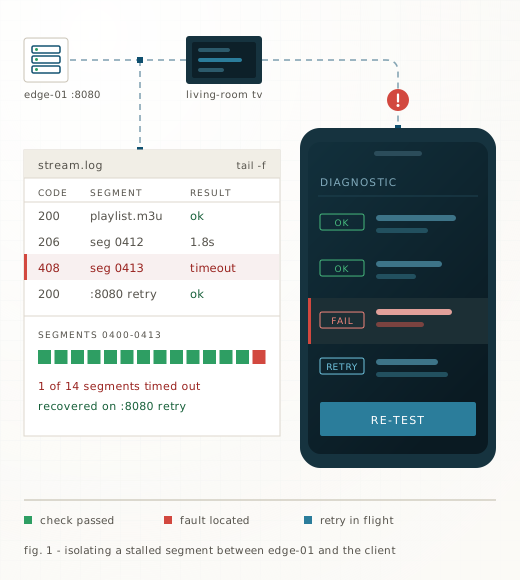
Several mirror hosts serve the same credentials. They carry the same line-up, but they do not carry the same load at the same time, and a host under pressure shows up as stutter on the busiest channels while the quiet ones look perfect. Change the host address in your player, leave the username and password exactly as they are, and replay the channel that was failing. If the swap holds, you have your answer and nothing else needs touching.

Two tests to run before you post

Play the same channel on a second device on the same network. Then play a different channel on the original device. Those two tests separate a line fault from a device fault from a dead source in under two minutes, and they turn a four-day thread into a one-reply thread. Note the clock time as well, because load-related faults cluster around evening kickoffs and the timestamp tells us where to look.

Reading order if you are new

The click-by-click install steps for each app live at https://iptv.chat/guide, and that is where to start if you have never entered credentials before. After that, read the mechanism page here for the vocabulary, because most of the disagreements in these threads are two people using the word line to mean different things. Then open the symptom page that matches what is in front of you. Almost everybody arrives in the opposite order and loses an evening to it.

What it costs

1 Month
 
$10.99
$10.99 per month, per device
  • Complete channel list & on-demand
  • 4K, FHD and HD where broadcast
  • Xtream Codes, M3U or MAG
  • Every mirror host
Choose 1 Month
3 Months
Save 24% vs monthly
$25.00
$8.33 per month, per device
  • Complete channel list & on-demand
  • 4K, FHD and HD where broadcast
  • Xtream Codes, M3U or MAG
  • Every mirror host
Choose 3 Months
6 Months
Save 47% vs monthly
$35.00
$5.83 per month, per device
  • Complete channel list & on-demand
  • 4K, FHD and HD where broadcast
  • Xtream Codes, M3U or MAG
  • Every mirror host
Choose 6 Months
2 Years
Save 66% vs monthly
$90.00
$3.75 per month, per device
  • Complete channel list & on-demand
  • 4K, FHD and HD where broadcast
  • Xtream Codes, M3U or MAG
  • Every mirror host
Choose 2 Years

Priced per device in US dollars. Your bank may settle in EGP through our payment provider — the amount is the same.

Questions

My stream buffers every few minutes. What do I change first?

The host. Open the profile or account screen in your player, replace the host address with a different mirror, and leave the username and password untouched. Replay the channel that was failing, not a random one. If it holds for ten minutes, stop there.

Does buffering always mean my internet is too slow?

No, and the pattern tells you which it is. A slow connection degrades everything at once, including video in a browser tab on the same network. A loaded host degrades some channels and leaves others clean. If only a handful of channels stutter, your line speed is not the story.

Can two TVs use the same credentials at the same time?

No. One line carries one simultaneous stream. The second device to connect will either refuse to start or knock the first one off mid-play, and that is the system behaving as designed rather than a fault to report.

I was given new credentials and the old ones died. Why?

Because a reissue replaces, it does not duplicate. The moment a new username and password are generated, the previous pair stops authenticating. Delete the old profile from your player instead of leaving it in the list, since most apps retry a dead profile quietly and surface it as a generic network error.

Is a playlist URL the same thing as an Xtream login?

Same content, different plumbing. An M3U playlist URL is one long address with your credentials buried inside it. An Xtream Codes login splits the same information into separate server, username and password fields. The mechanism page covers when each one is the better choice.

A channel I watched last week has vanished from my list.

Refresh the playlist in your app before assuming anything broke. Line-ups get renumbered and renamed at source and most players cache the old list until you force a reload. If it is still missing afterwards, check whether that channel belongs to the region your line was issued against.

How do I tell which delivery format I have?

Look at what got typed into the app. One long web address means M3U. Three separate boxes for server, username and password means Xtream. If somebody set it up for you and you genuinely cannot tell, ask support to resend the credentials rather than guessing and locking yourself out.

How long should I test a new host before believing it worked?

Ten minutes on the channel that was failing, at the hour it normally fails. A clean thirty seconds on a channel that was already fine proves nothing, and it is why the same person posts the same thread again the following evening.

The picture is fine but the audio drifts out of sync.

Restart the channel, then try a second player on the same device. Drift that follows the app is a decoder problem and no host swap will touch it. Drift that survives two players on two devices is worth reporting with the exact channel name attached.

One device fails and everything else on the network is fine.

Then the line is not your suspect. Work the device: one profile only, current app version, wired if the option exists. A fault that sits on a single box while a phone on the same Wi-Fi plays cleanly has never once turned out to be the credentials.

Should I reboot the router before posting?

It costs two minutes, so yes, but do it before you start testing rather than halfway through. A reboot dropped into the middle of a host comparison destroys the only useful property of the comparison, which is that exactly one thing changed.

Everything died at once on every device with a login error.

That is not a streaming fault. Either the line reached its expiry date or the credentials were reissued and the old pair retired. Testing hosts against an expired line will fill your evening and prove nothing at the end of it.

Wi-Fi or wired for the main TV?

Wired where the run is possible, because it removes the one variable nobody in a thread can measure for you. Where it is not, at least confirm the TV is on the same band and in reach of the router before you start blaming a host.

Where do questions about orders and terms go?

To the shop at https://trexiptv.click. Nobody here can see an order, extend a line, or tell you what anything costs, so threads that head that way get moved rather than answered.

Still stuck after all that?

Send the channel, the device and the app you are using and we will look at the line itself.